
Position Size Calculator
Use this calculator to find the correct amount of lots or units you need to buy or sell and control exactly how much risk you take on each trade
Live Chart
What does this calculator do?
This calculator helps you determine the exact amount of lots or units you should trade to help you control risk and ensure you never risk more than you intend to.
In simple terms - it tells you how many shares, crypto coins, ounces of gold, barrels of oil, or units of currency you should buy or sell to keep your risk at the level you choose.
To get consistent results in trading, your risk has to stay consistent. If it doesn’t, one bad trade can wipe out months of progress.
So before you start trading, decide how much you want to risk on each trade. Some traders choose higher risk for faster growth, others prefer lower risk to protect their capital - but whatever you choose, sticking to it is what matters.
How does the calculator know how much you should buy or sell?
For example, if you trade with a $1,000 account and choose to risk 1% of your balance per trade, your maximum risk per trade should be $10.
Now imagine buying 5 shares of Apple at $280 with a stop-loss at $275.
If the trade hits SL, you lose $25 - that’s 2.5× more than you intended.
But if you buy only 1 share, you lose $5 - which is 2× less than you should be risking.
If your trade is too small, your winning trades will make you less profit.
If your trade is too big, your losing trades will cost more than planned, and one mistake could even blow up your account.
This calculator removes all the guessing. It gives you the correct position size every time, no matter what instrument you trade or how wide your stop-loss is. Your risk stays consistent, and your results become controlled, not of random.
Do I need to use this calculator for every trade?
Yes - you should use this calculator for every trade, unless you can calculate position size without it.
Your goal as a trader is to know exactly how much money you are risking before you place a trade. If you enter a trade without knowing the risk, that’s a sign your risk management needs improvement.
Many traders lose money not because their analysis is bad, but because their position sizes are random.
On one trade they risk $5, on the next they risk $80, the next risks $30… and the results become unpredictable.
This calculator helps you keep it consistent.
You always know:
- how much you’re risking
- how much you’re buying or selling
- and whether the trade fits your plan
If you want controlled, consistent results, you must control your risk on every trade - not just the ones that “feel important.” This calculator makes that easy, fast, and accurate.
Calculator Breakdown
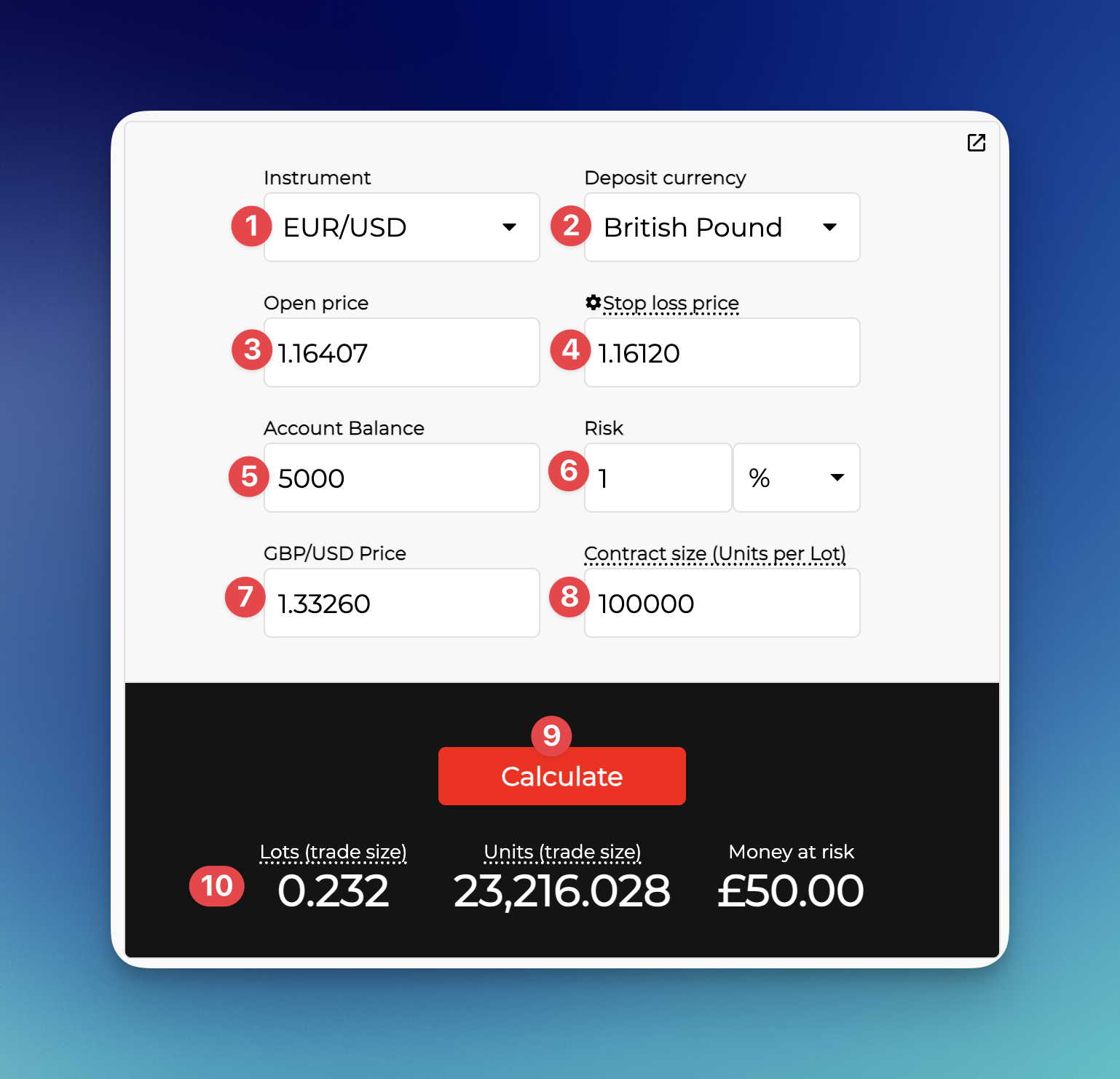
1. Instrument – Select the asset you are about to trade.
2. Deposit Currency – Choose the currency your trading account is in.
3. Open Price – Choose the currency your trading account is in.
4. Stop Loss Price – Enter the exact price where your stop-loss will be triggered (Visible only when using Stop Loss Price mode.)
5. Account Balance – Type in your current trading account balance.
6. Risk Amount – Specify how much you want to risk on this trade – either as a percentage of your balance or a fixed monetary value.
7. Exchange Rate – This field appears only when your deposit currency differs from the instrument’s quote currency. In most cases, it’s pre-filled automatically with the correct number.
8. Contract Size – Enter how many units make up one lot for the instrument you’re trading.
9. Calculate Button – Press this to run the calculation once all fields are completed.
10. Results Section – Shows the final output: The position size in lots; The position size in units; The exact amount you are risking
Video Guide
Learn how to use the position size calculator
FAQ
Should I enter my stop-loss in pips or in price?
We recommend always entering prices, not pips.
Pip sizes vary from one instrument to another, which makes it easy to miscalculate and get the wrong position size.
Entering your entry price and stop-loss price keeps everything simple, universal and error-free.
How do I switch the calculator from pips to price?
Simply click the gear icon next to the “Stop Loss (pips)” field.
A small popup will appear - press “Switch to Stop Loss Price” and you’ll be able to enter the actual stop-loss price.
Where do I find the contract size for my instrument?
Traders measure position size in lots.
A lot is simply a unit of measurement that represents how many units you’re buying or selling.
For example, in the stock market 1 unit = 1 share.
But 1 lot of a stock usually represents 100 shares.
So if you buy 0.01 lots of Apple shares, you’re buying 1 share(unit) of Apple.
But different markets use different lot sizes, and different brokers tend to use different lot values for some instruments.
For example, 1 lot of a Forex pair is usually 100,000 units of the base currency (e.g. 100k USD). But some spread-betting or alternative account types may use 10,000 instead.
Because contract sizes vary from asset to asset (and broker to broker), you always need to check the correct value before calculating your position size.
Otherwise, the result will be incorrect.
If the real lot size is 10, but you type 100 into the calculator, you’ll accidentally open a position 10× larger than you intended.
How to find the contract size on your platform:
Broker’s web/app platform:
Look for the asset specifications/details tab (info icon).
There you should see a section called Contract Size (or Lot size/units per Lot).
On MetaTrader:
Go to Quotes tab, tap (or right-click) the instrument → choose Details (or specifications).
Look for Contract Size.
Once you know the correct contract size, enter it into the calculator and you’ll get an accurate trade size every time.
Why does the calculator ask for an exchange rate?
The calculator asks for an exchange rate because the value of your position has to be converted into your account currency.
For example, the value of 100,000 AUD is not the same as 100,000 GBP.
1 GBP = 2 AUD, so:
• 100k AUD ≈ 50k GBP
• 100k GBP ≈ 200k AUD
Both are 1 lot, but have completely different monetary value.
To calculate your risk properly, the calculator needs to know the current exchange rate between the instrument you’re trading and the currency of your account.
In most cases, the calculator fills this in automatically with the correct rate. For some assets it won't even ask for an exchange rate.
But if you want to double-check, just look up the price of the currency pair shown next to the exchange-rate field and enter that number.
What risk percentage should I choose?
We always recommend keeping risk levels low.
Increasing risk to “make money faster” usually backfires, because every trader goes through both winning and losing phases.
Traders who risk too much might grow accounts faster during good periods but get wiped out during bad ones. Most of them end up giving all profits back to the market in the long-term.
Low risk trading might feel slow, but it’s the way to stay consistent and protect your capital and profits long-term.
A good risk range for most traders is 0.5-1% per trade.
If you want to be trade aggressively, you can risk 2-5%, but you should be prepared to see bigger and faster drawdowns during losing phases.
We do not recommend risking more than 5% on a single trade.
For example, if you risk 10% per trade, 10 losing trades in a row would completely wipe out your account — and losing streaks happen to everyone.
Small risk keeps you in the game. Big risk takes you out of it.
The calculator shows 0.004 lots, but the minimum on my platform is 0.01. What should I do?
If the calculator shows 0.004 lots, but your platform’s minimum size is 0.01, that means the minimum you can trade is 2.5× bigger than what your risk plan allows.
This means one thing - taking this trade would break your risk management rules.
If you enter 0.01 lots, you’ll risk more than planned. And if you keep doing that, your results will become inconsistent and your losing trades will hit much harder than they should.
A big part of risk management is discipline and knowing when not to enter a trade.
If your account size does not allow proper position sizing, the correct move is to either:
Increase your capital, or
Skip the trade until the required size is possible.
Never enter trades that force you to risk a lot more than your plan allows - that’s how traders burn accounts.
Access Exclusive Bonuses:
Set up a trading account with our partner trading platform to access improved trading conditions and special rewards.